Intune at Ignite 2026: agents under control, less exposure and more visibility

Aitor García · 4 min read
Also in Spanish
The 14 Microsoft Intune announcements from Ignite 2026, where each one stands, which license you need and what to try now.
Leadership summaryIf this is all you read.
The risk. AI agents are already being installed on your employees' devices, often without IT knowing. Ignite brings controls to find and block them, but almost everything is in preview.
The impact. Intune now manages agents, Windows servers and vulnerability remediation from the same console. Several features have been included in Microsoft 365 E3 and E5 since July 2026.
The decision. Pilot the software compliance policy and CIS auditing now, and plan server management and agent-driven remediation for 2027.
For the people rolling it out ↓
On this page
At Ignite on November 17, Microsoft presented what’s coming to Intune for the next year. There are 14 announcements with a common thread: the user’s device is no longer just a laptop with Office, it’s also where AI agents run. Intune wants to be the layer that decides which agents can run, with what access and on which devices.
Before the details, an important caveat: almost everything arrives in preview. It’s for testing and planning, not for changing your production operations today.
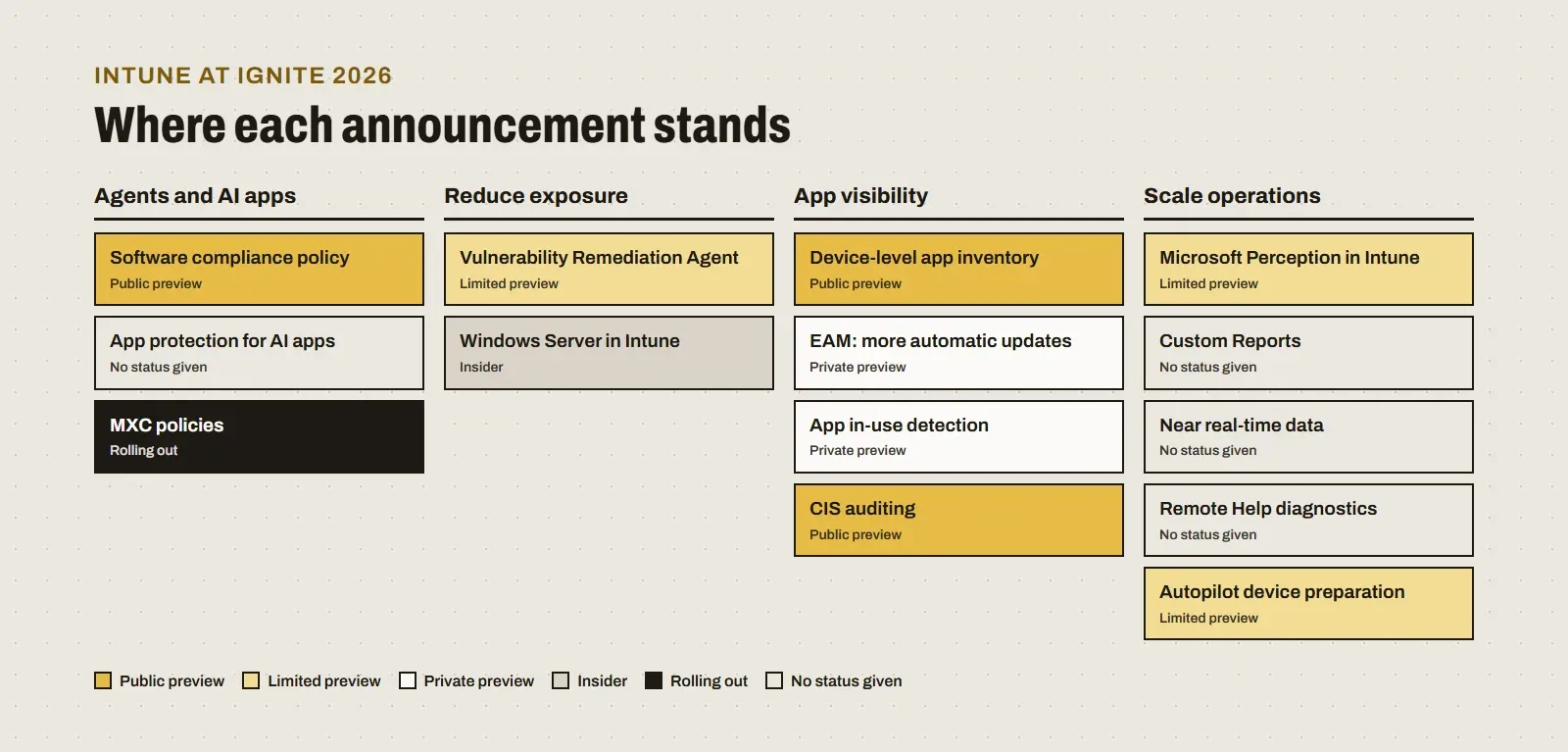
Agents and AI apps: controlling what runs on the device
This is the most relevant block for a CISO, because it tackles a problem that already exists: employees installing assistants and agents on their own.
- Software compliance policy (public preview, Windows). It marks a device as noncompliant when it has unsanctioned agents installed, identified by their MSI product code. With Conditional Access, that device loses access to company resources and the user is guided to remove the agent.
- App protection for AI tools. Microsoft Copilot, GitHub Copilot, Claude and ChatGPT have integrated the Intune SDK, so you can now apply app protection policies to them: for example, preventing company data from being copied to personal accounts.
- Microsoft Execution Containers policies (rolling out). They set limits on which files and which network supported agents running inside those containers can reach.
Reduce exposure: patching and servers
- Vulnerability Remediation Agent (limited preview). It combines Defender vulnerability data with Intune context, prioritizes CVEs by severity and number of exposed devices, and proposes remediation steps: Windows updates, app updates or configuration changes. It runs on Security Copilot.
- Windows Server management in Intune (Insider preview). It brings eligible servers into Intune, including branch servers and persistent virtual desktops, to configure them, deploy apps, measure compliance and update them with Windows Autopatch. Azure Arc stays for infrastructure governance.
App visibility: knowing what’s installed and keeping it current
- Device-level app inventory (public preview). More detail on each application and better reporting.
- More automatic updates with Enterprise App Management (private preview). They extend to more verified Windows apps, including ones IT didn’t deploy, without manual packaging or one policy per app.
- App in-use detection (private preview). It detects whether an open app will block an installation and lets you close it, with or without notifying the user.
- CIS auditing (public preview, November). It compares Windows 11 devices with the CIS benchmark without changing any settings, as was already possible with DISA STIGs. It measures how far you are from the standard before you fix anything.
Scale operations: asking instead of building reports
- Microsoft Perception in Intune (limited preview). You ask a question in plain language and it turns it into a multistep investigation: it writes and runs the queries, combines results and cites each step. What it finds can be saved as a custom report or turned into a group of devices or users. For the full context, read my article on Microsoft Project Perception.
- Near real-time data. Faster Windows app inventory and policy reporting, with timestamps and new registry key and file inventory.
- Remote Help diagnostics for Windows. More device context during a support session.
- Autopilot device preparation (limited preview). After initial setup, Company Portal opens and the user sees compliance and app progress without being blocked.
Which license you need
The announcement doesn’t mention licensing, but several of these features depend on components that changed plans this year:
| Announcement | What you need |
|---|---|
| CIS auditing | Intune Advanced Analytics, included in Microsoft 365 E3 since July 2026 |
| Remote Help diagnostics | Remote Help, included in Microsoft 365 E3 since July 2026 |
| Automatic app updates | Enterprise App Management, included in Microsoft 365 E5 and E7 |
| Vulnerability Remediation Agent | Security Copilot and Defender Vulnerability Management |
| Software compliance with blocking | Intune and Conditional Access (Entra ID P1) |
To see what your plan includes, feature by feature, use the licensing section or compare E3, E5 and E7.
What I’d do this week
- Inventory AI agents and apps. Before blocking, measure what’s installed on your devices.
- Pilot the software compliance policy with a small group, with the Conditional Access policy in report-only mode, to see who it would block before blocking anyone.
- Turn on CIS auditing if you already have Advanced Analytics: it gives you a baseline without touching configuration.
- Apply app protection to the AI tools you already allow, so company data doesn’t end up in personal accounts.
- Sign up for the previews you care about, such as Windows Server or Perception, with a test tenant or a small group.
Sources
Reviewed on November 18, 2026.